Download Twitter/X Videos on Your Phone
Download Twitter/X videos in your mobile browser without installing an app. Learn how to copy a post link, select quality, and save files on iPhone or Android.
This guide covers the TwitterXZ website. Open Safari on iPhone or Chrome on Android; you do not need to install an app.
Step 1: Copy the post link
Find a public Twitter/X post containing a video. Open its share menu and choose Copy link. Use the individual post URL, rather than a profile URL.
Step 2: Parse in your browser
Open the TwitterXZ homepage, paste the link, and submit it. Choose from the quality options actually available for that video. Resolution depends on the source; not every post offers 1080p.

Step 3: Open the video and save it
iPhone: choose Open video to save. The media opens in a new tab; if it plays, check the player or Safari menu for download, save or share options. If the video is saved in Files, open it and use the share menu's Save Video option to copy it to Photos, when available. Menu names and supported actions vary by iOS version and file format.
Android: use the player or Chrome menu to download the opened video, then confirm the download. Find the file in the browser's download history or your device's Downloads folder. Some gallery apps also show downloaded videos automatically.
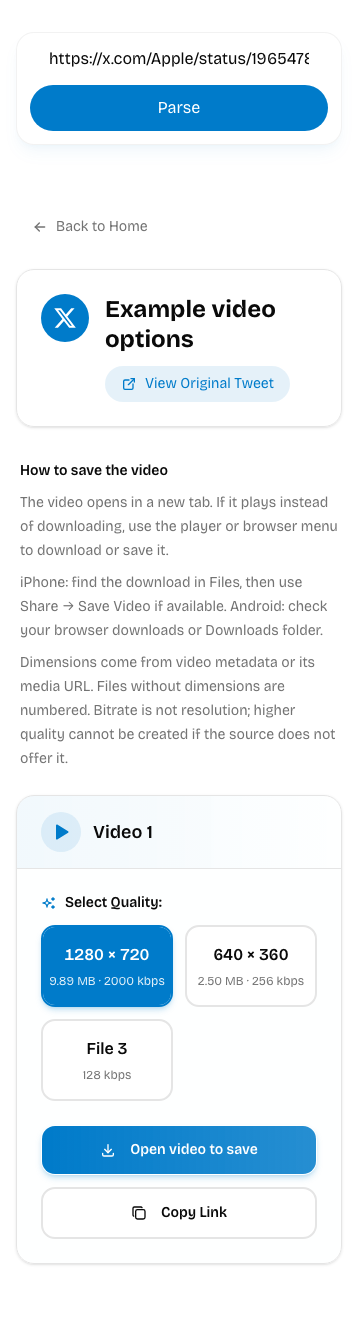
These screenshots show the current web interface. Result values are fixed demonstration data, not a real post’s quality or file size. Use the options returned for your own link.
Why does the video play instead of downloading?
Your browser opens the media URL directly and may choose playback first. This does not mean parsing failed. Check the player, share menu or browser menu for save options. If an in-app browser does not offer them, open the link in Safari or Chrome.
Why is there no 1080p option?
Results show confirmed width and height, such as 1280 × 720. Files without confirmed dimensions have numbered labels. Bitrate is separate information and is not a resolution measurement. Choose an available file; the tool cannot create higher quality absent from the source.
Why does the saved video have no sound?
Check player mute, device volume and whether the original post has sound. Twitter/X GIF content typically has no audio track. If the original has sound but your file does not, try another available file or parse again. A higher bitrate does not prove that audio is included.
If downloading fails
Check that the post is public, still exists, and that you copied the complete link. Retry parsing later if necessary. For download problems, check browser permissions, free storage, and network access to the video resource. The website does not require the old app's VPN-switching or rewarded-ad steps.
For a desktop walkthrough, see how to download Twitter videos.
Website versus app
The separate 阿星的工具箱 app download page is still available. Its interface, advertising, and download process are separate from the website; older app screenshots do not describe the current web interface.
Only download content you have permission to save. Public availability does not grant permission to republish or use it commercially.